
If you're running Google Ads for your therapy practice, there's a good chance you're spending more than you need to. One of the most common issues I see when auditing therapist ad accounts is this: your ads are showing up when people search for other therapists by name. That's your budget going toward clicks that will never convert into your clients.
Broad, Phrase, and Exact Match
Google Ads gives you three keyword match types, and the one you choose determines how loosely or tightly Google interprets your keywords.
Broad Match is the loosest option. If your keyword is anxiety therapist Vancouver, Google might show your ad for searches like "what is anxiety," "Vancouver counselling reviews," or even another therapist's name. Broad match casts a wide net, but most of what it catches isn't relevant.
Phrase Match requires the search to include the meaning of your keyword, but still allows for additional words. Your ad might show for "best anxiety therapist in Vancouver" or "affordable anxiety therapist Vancouver downtown." It's tighter than broad match, but still lets in searches you might not want.
Exact Match is the tightest option. Your ad only shows for searches that match the meaning of your keyword very closely. If your keyword is [anxiety therapist Vancouver], your ad appears for "anxiety therapist Vancouver," "Vancouver anxiety therapist," and close variations, but not for unrelated or loosely related searches.
You Don't Want to Show Up for Another Therapist's Name
Here's a scenario I see regularly. A therapist is running ads with broad match keywords. They check their Search Terms Report and discover their ads have been triggered by searches like "Dr. Sarah Mitchell therapist Vancouver" or "John Park counselling." These are people looking for a specific practitioner. They're not your prospective clients, but you're paying every time they click on your ad.
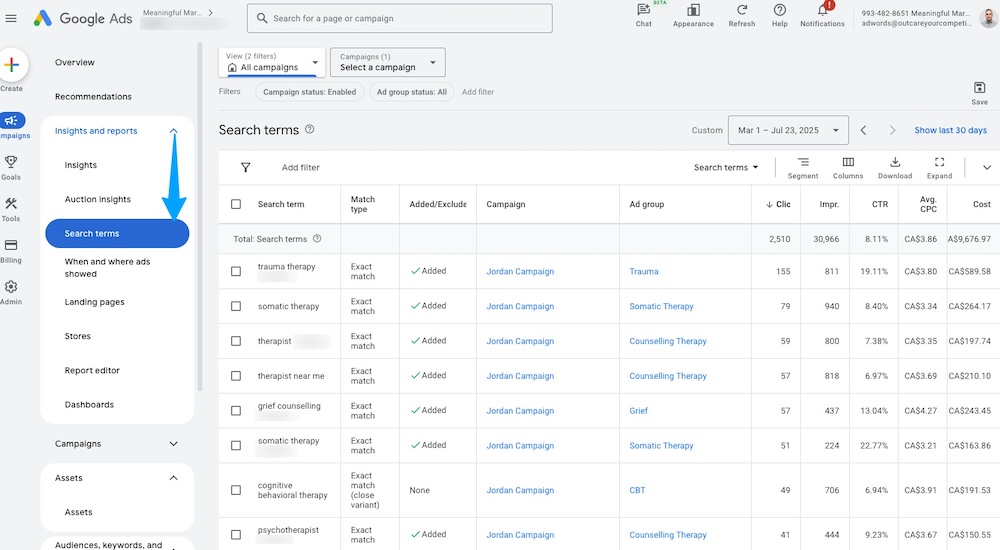
The Search Terms Report is one of the most important tools in your Google Ads account. It shows you the actual searches that triggered your ads, and it's often full of surprises. Name-based searches, unrelated conditions, and geographic mismatches are common culprits draining budgets.
Exact Match = More Qualified Clicks
Switching to exact match keywords delivers four immediate benefits:
- Stop wasting money on irrelevant clicks that will never become clients.
- Reach active searchers who are specifically looking for the service you offer, in the location you serve.
- Lower your cost-per-click because your ads become more relevant, which improves your Quality Score.
- Increase your conversion rate because the people clicking your ads actually want what you provide.
When every click costs between $3 and $15 or more, the difference between exact match and broad match can mean hundreds of dollars per month in wasted spend.
How to Fix This
If you're currently running broad match keywords, here's how to tighten things up:
- Run your Search Terms Report. In your Google Ads account, navigate to Keywords, then Search Terms. Review the actual queries triggering your ads. Look for names, irrelevant topics, and geographic mismatches.
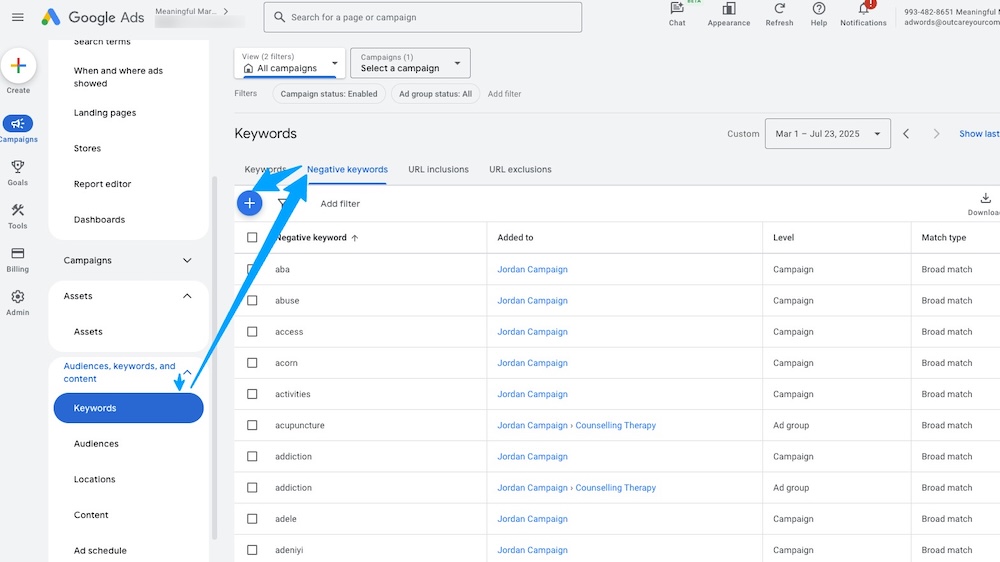
- Add negative keywords. For every irrelevant search term you find, add it as a negative keyword so your ad never shows for that term again. Build a negative keyword list that includes other therapists' names, unrelated conditions, and terms like "free," "jobs," or "salary."
- Switch to exact match. Update your existing keywords to exact match by wrapping them in square brackets: [anxiety therapist Vancouver]. Create new exact match keywords for each specific service and location you want to target.
- Avoid broad match entirely. Unless you have a large budget and are specifically testing for new keyword ideas, broad match will cost you more than it returns in the therapy space.
Best Practices
Once you've made the switch, maintain your account with these habits:
- Start with exact match for every new keyword you add. It's always easier to loosen targeting later than to tighten it after wasting budget.
- Use phrase match sparingly. Only expand to phrase match if your exact match keywords aren't generating enough volume, and monitor the Search Terms Report closely when you do.
- Check your Search Terms Report regularly. At minimum, review it weekly during the first month and biweekly after that. New irrelevant terms will continue to appear.
- Build your negative keyword list continuously. Think of it as a living document. The more comprehensive it becomes, the less waste you'll see in your account.
Final Thoughts
Every dollar in your Google Ads budget should be working to drive genuinely interested potential clients to your practice. Exact match keywords eliminate the noise, reduce wasted spend, and ensure your ads reach the people who are actively looking for the help you provide. It's one of the simplest changes you can make to your account, and it often has the biggest impact on your return on investment.

Jordan helps therapists and wellness practitioners get found and get booked. He has run his own SEO, Google Ads, and web design company since 2012, and in 2022 began working specifically with therapy practices across North America.